Blog · 29 Oct 2026 · 4 min read
Day to dusk photo editing: free tools, DIY and paid services compared
Day to dusk, or virtual twilight, turns a daytime exterior into an evening scene with lit windows and a dusk sky. Searches like "day to dusk photo editing free" and "day to night photoshop" show plenty of agents and photographers want to do it themselves. That's possible. Here's an honest look at the free and DIY options, what they do well, and where they fall short.
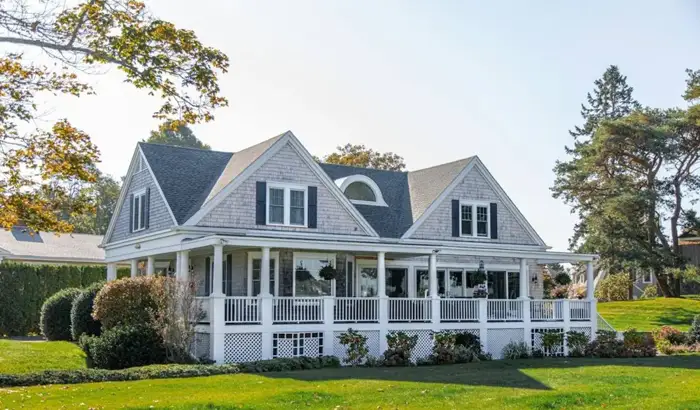
Before
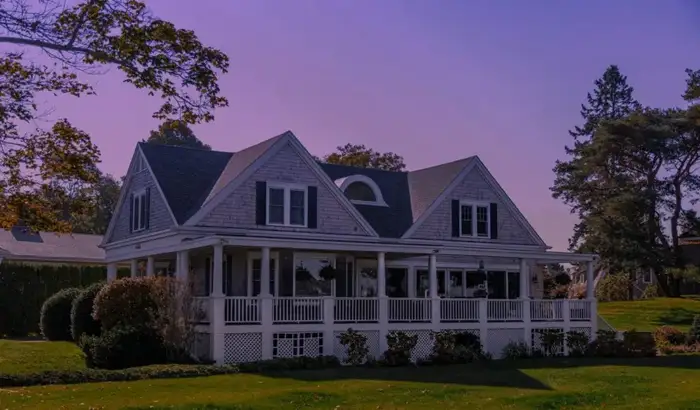
After: our virtual twilight edit
Option 1: Free AI apps and online tools
Several free or freemium AI tools offer one-click "day to night" or "twilight" filters.
- Good at: quick previews, simple scenes with a clean skyline, and social media posts where the image is small.
- Weak at: realistic window glow (often uniform orange blocks), edges around trees and gutters, and keeping the house itself accurate. Some tools change details of the building, which is a problem for a listing.
- Other catches: watermarks, low-resolution exports on free tiers, and terms that may let the tool use your uploads.
Option 2: Free desktop editors (GIMP, Photopea)
Free editors with layers and masks can do a proper manual twilight edit.
- Good at: full control at no cost.
- Weak at: speed. A convincing edit takes practice and a fair amount of time per photo, especially while you're learning.
Option 3: Photoshop or Lightroom (paid subscription)
Professional tools with sky replacement and AI masking make the job faster, and actions or presets can handle the colour grading.
- Good at: high-quality results once you know the workflow.
- Weak at: cost and learning time for occasional use.
The DIY workflow, step by step
- Start with a good photo: straight on, level, even light, and every light switched on during the shoot.
- Mask the sky and refine the edges around the roof, trees and wires.
- Add a dusk sky that suits the direction and surroundings.
- Darken and cool the scene with a curves or exposure adjustment, keeping some detail in shadows.
- Paint in window glow on a separate layer, room by room, with warm, soft light and slight variation.
- Light existing exterior fixtures with small, soft glows and light spill on nearby walls and ground.
- Fix reflections in windows, water and glossy paving.
- Check at 100% for halos and colour fringes, then export.
When DIY makes sense
- You enjoy editing and have the time.
- You need a twilight occasionally, not for every listing.
- The image is for social media, where small flaws matter less.
When paying for it makes sense
- It's the lead image of a listing, where quality matters most.
- You need several each week.
- Your time is better spent on clients and viewings.
- You need a consistent standard across listings and agents.
Whichever route you take, stay accurate
Only light what exists, don't change the building or its surroundings, and label the image as a virtual twilight where your MLS or portal expects it. See our disclosure guide and our main guide to virtual twilight for real estate.
Example: timing a DIY edit
Time yourself on your first few DIY twilights, step by step: masking, sky, relighting, windows, reflections and checking. Most people find masking around trees and the window glow take the longest. Once you know your own time per photo, compare it with the per-image price of a service, and with what that time is worth to you.
Common DIY mistakes, and quick fixes
- Orange blocks for windows: paint glow with a soft brush at low opacity, and vary it between rooms.
- A halo along the roof: shrink the sky mask by a pixel or two and refine edges at 100% zoom.
- A house that's too dark: keep the facade readable. Buyers still need to see materials and condition.
Try a paid edit for free
If you'd like to compare your DIY result with a professional one, send us the same daytime photo and we'll send back a twilight version free. Twilight is included as needed in our listing photo editing: US$29 for your first listing, then US$45 per listing or US$229 a month. We can also make a short AI video or social posts from your listing photos.
Frequently asked questions
Can I do day to dusk editing for free?
You can get a basic result with free apps and AI tools, especially on simple exteriors. Convincing window glow, matched shadows and clean edges usually need manual work or a paid edit.
Is there a Photoshop action for day to night?
Actions and presets exist, and they can speed up the grading. They can't do the masking and window lighting for you, so expect to work on each photo by hand.
How much does a paid day to dusk edit cost?
Published prices from online services are commonly around $5 to $10 per image. Ours is included as needed in our per-listing price, from US$29 for your first listing.
What's the difference between day to dusk and day to night?
Day to dusk keeps some colour in the sky, with deep blue or warm tones, which usually looks best for listings. A full night edit with a black sky tends to hide the building and looks less inviting.
Will AI day to dusk change my property?
Some tools alter windows, rooflines or landscaping. Compare the result carefully with the original, and don't publish an edit that changes the property.
Which photos should I convert to dusk?
Usually just one: the front exterior used as the lead image. A back garden or pool with existing lighting can be a good second choice. Converting every exterior tends to look staged.
Can I post a virtual twilight on social media without labelling it?
Rules for social posts are less formal than for MLS listings, but the same honesty principle applies. A short 'virtual twilight' note in the caption is easy and avoids complaints.
Related
- Real estate listing photo editing
- How to declutter real estate photos: before the shoot and in editing
- Is virtual staging legal, and is it worth it? A realtor's guide
- How to outsource real estate photo editing (and choose the right editor)
- Real estate photo editing in Australia and the UK: what agents should know
- Real estate photo editing prices: what you should pay per photo or per listing
- Real estate photo editing software vs an editing service: which is right for you?
- Sky replacement in real estate photos: how to do it honestly and well
- Virtual twilight for real estate: when day-to-dusk photos help a listing
- AI listing photos: what realtors must disclose
This article is general information, not legal advice. Rules change; check the linked official sources.